Virtual Staging AI In-Depth Review: Unlimited Renders per Image
Turns empty-room property photos into furnished listing visuals without a photographer or staging crew.
Disclosure: Some links below are affiliate links. At no additional cost to you, we may earn a commission if you purchase.
The Verdict & Ratings
Virtual Staging AI is an incredibly efficient real estate visual tool. The latest update introduces an "unlock once, render unlimited" billing model alongside twilight conversion and item removal. While it delivers results in under a minute, agents must watch out for the AI accidentally erasing permanent fixtures during decluttering.
Overall Score
4.6
/ 5.0
Ease of Use
Minimalist UI, 3 steps from upload to export, takes under 1 minute to master.
Value
2 free credits upon sign-up; spending 1 credit on a photo unlocks unlimited rerolls for that specific image.
Quality
Excellent lighting integration, but struggles with fixture misidentification during complex removal.
Adaptability
Covers vacant staging, clutter removal, and day-to-dusk twilight scenes.
✅ Best for
Solo real estate agents and photographers with standard vacant listings who need lightning-fast turnarounds and want to avoid hidden pay-per-generation fees.
❌ Not for
Agents lacking the time for manual review before uploading to the MLS, or luxury brokerage teams dealing with highly complex, custom architectural layouts.
Quick Decision Table
| Feature | Details & Hands-on Metrics |
|---|---|
| Tool | Virtual Staging AI (virtualstaging.ai) |
| Best for | Lightning-fast vacant room staging, one-click clutter removal, and day-to-dusk twilight effects. |
| Price | $25/mo (Starter plan w/ 20 credits, ~$1.25/image); $39/mo (Unlimited plan). |
| Free Tier | 2 full credits upon sign-up with no credit card required (supports watermark-free, high-res downloads). |
| Verdict | Highly Recommended. The ability to unlock an image for unlimited tweaking drastically lowers the cost of trial and error, and the speed is phenomenal. |
How We Tested
We conducted a hands-on test of Virtual Staging AI's latest dashboard in 2026. This test cost us $0; we registered a new account and utilized the 2 free credits provided upon sign-up, without linking a credit card.
We selected a challenging real-world scenario: a photograph of an open-concept kitchen and living room featuring a granite island, hardwired pendant lights, and cluttered furniture in the background. We dragged the image into the KV Management panel and clicked "Unlock unlimited renders for 1 credit." The token balance immediately dropped from 2 to 1.00. The system then processed the high-res image and returned the result in under 30 seconds. The entire process was seamless, with no queues or crashes.

Core Features Tested
Hands-on Test 1: The "Unlimited Renders" per Image Mechanism
I tested its billing logic, and the result is a game-changer: it does not charge per click. Instead, it charges "per base image." Once you spend 1 credit to unlock a raw photo, you can switch to the Standard model, try the Multi-angle view, or input a Custom Prompt to fine-tune the design—all without being charged again. This completely eliminates the fear of wasting money on failed renders.
Hands-on Test 2: Item Removal and Fixture Over-Erasure
I tested the Item Removal feature on a kitchen photograph featuring a permanent built-in gas stovetop and hardwired pendant lights. While the tool processed the edit quickly, the result exposed a severe AI limitation: instead of just clearing movable items, the algorithm acted too aggressively and completely wiped out permanent architectural fixtures—erasing the stovetop from the granite island and deleting the hanging lights from the ceiling.
Feature Observation: Twilight Mode & Custom Prompts
Inside the updated 2026 interface, Virtual Staging AI now offers dedicated tabs for "Twilight" (day-to-dusk conversion) and "Custom Prompt" text inputs alongside its standard presets. While we focused our credit on the decluttering run, the inclusion of free-form prompts indicates the tool has moved beyond rigid one-click templates, allowing for targeted staging adjustments.
Head-to-Head Comparison
| Feature | Virtual Staging AI (Tested) | AI HomeDesign (Competitor) | Collov AI (Competitor) |
|---|---|---|---|
| Free Trial Barrier | 2 free credits upon sign-up (Watermark-free) | Offers a free trial, but includes massive watermarks | Strict limits on generation volume and features |
| Trial & Error Cost | Extremely Low (Unlimited rerolls per unlocked image) | Requires pay-per-image or monthly credit packs | Deducts fixed credits for every single re-generation |
| Feature Integration | Staging + Removal + Twilight + Custom Prompts | Staging + Decluttering + Partial Editing | Heavily leans toward multi-style renders for social media polls |
| Wait Time | Under 30-40 seconds/image | Approx. 30-60 seconds/image | Approx. 40-60 seconds/image |
Pain Point Solutions
How to Stage Vacant Properties Fast
Pain Point & Traditional Cost
Vacant homes often look small, cold, and uninviting on the MLS. Traditional physical staging requires moving trucks and furniture rentals, costing upwards of $500 to $2,000+ per listing, with a 3-5 day turnaround.
AI Solution
Select your room type under the Virtual Staging mode, and in under a minute, the empty room is transformed into a fully furnished, high-res image. This slashes the delivery cost to just $1.25 per image (or a flat rate on the Unlimited plan).
Removing Tenant Clutter from Listings
Pain Point & Traditional Cost
In rental or resale properties, clutter and worn-out furniture left by previous tenants severely damage the listing's visual appeal. Hiring a cleanup crew or outsourcing manual Photoshop editing costs $15-$30 per photo.
AI Solution
Switch to the built-in Item Removal mode to erase bulky, cluttered furniture with a single click, instantly restoring the room's true spatial volume and natural light.
❌ The Dealbreaker
Over-aggressive Erasing Leading to Structural Misrepresentation
During our kitchen test, the AI's "Item Removal" algorithm proved too aggressive. Not only did it remove the movable furniture, but it also completely wiped out the built-in gas stovetop from the granite island, turning it into a flat slab of stone. It even erased the three hardwired pendant lights hanging from the ceiling!
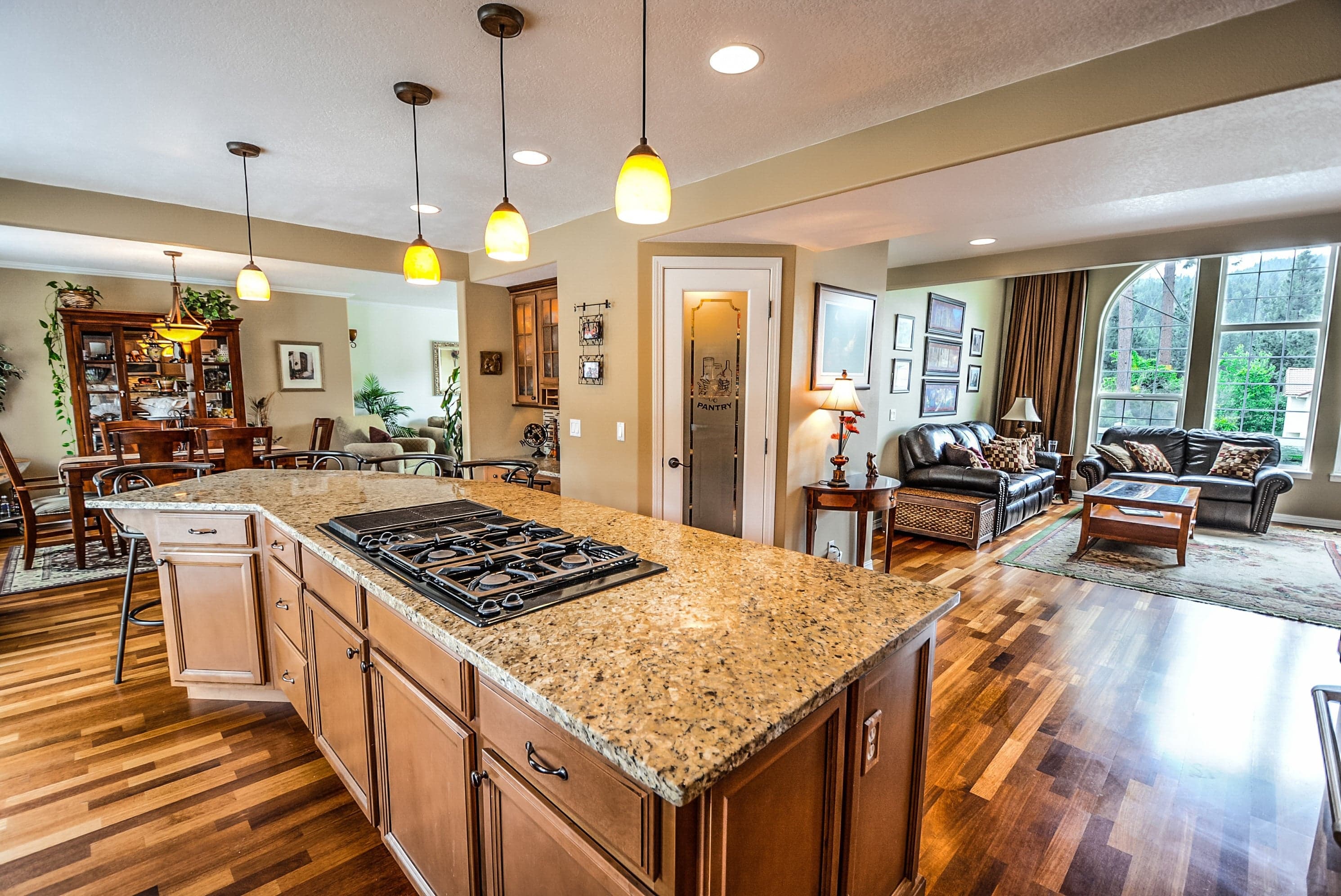
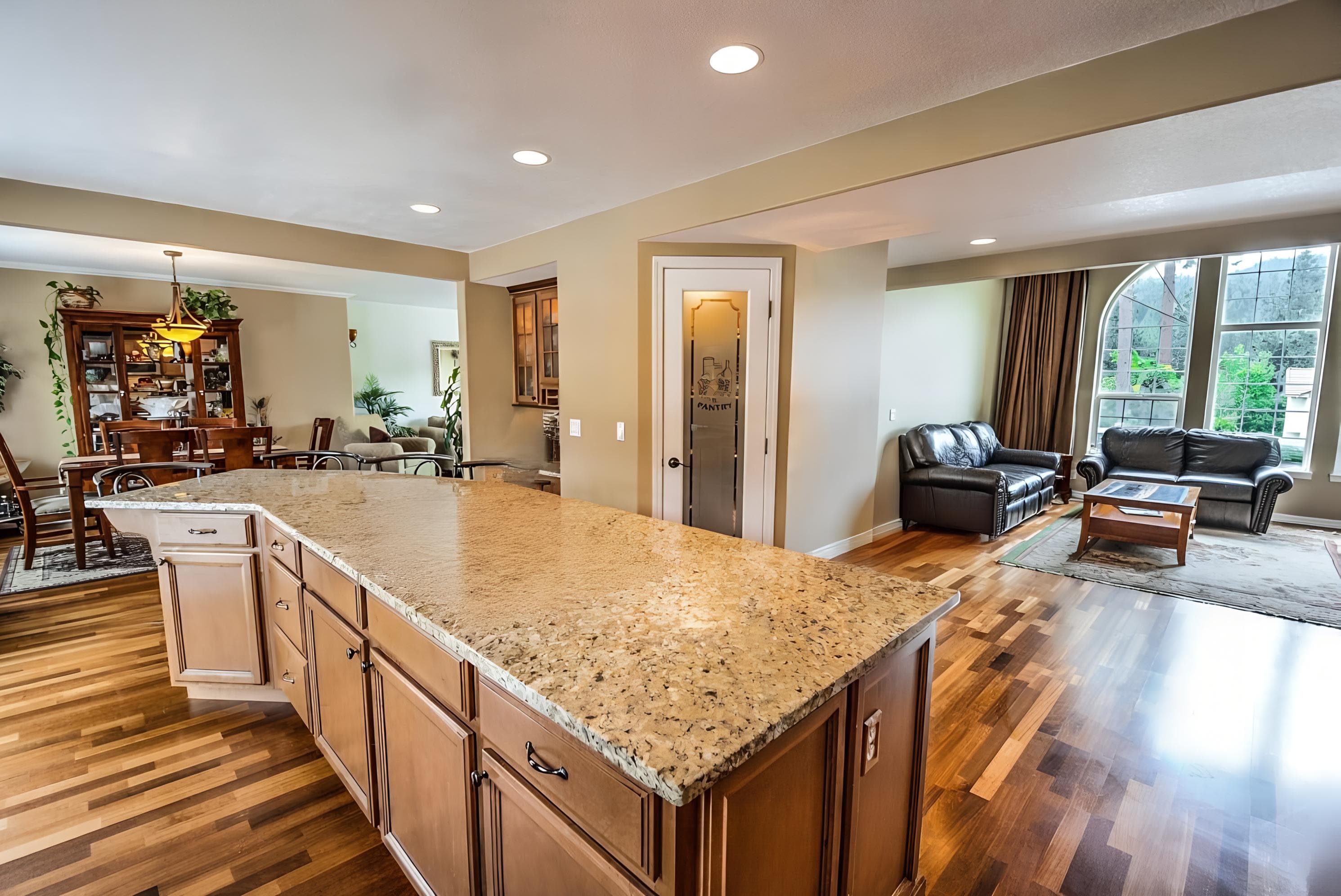
⚠️ Warning: In our test, the AI over-cleared the kitchen — it removed not only the furniture but also the built-in gas stovetop and the three hardwired pendant lights.
Compliance Warning for Agents
Displaying a kitchen island without its actual stovetop is considered "Structural Misrepresentation" in real estate transactions. After using the item removal feature, agents must visually verify that permanent fixtures remain intact. Never upload photos to the MLS that have had built-in appliances or structural fixtures erased!
Frequently Asked Questions
Are the 2 free credits on Virtual Staging AI watermark-free?
Yes. Based on our hands-on testing, the 2 signup credits provide high-resolution, completely watermark-free images that can be used directly on MLS listings.
What does "Unlock Unlimited Renders for This Image" mean?
It means you only spend 1 credit to unlock a specific uploaded photo. Once unlocked, you can generate variations, change styles, or retry prompts an unlimited number of times without consuming more credits.
Does Virtual Staging AI support day-to-dusk twilight conversion?
Yes. The platform now features a dedicated Twilight tab inside the main dashboard, allowing agents to transform daytime interior and exterior photos into dusk lighting.
Try Virtual Staging AI with 2 free credits
2 free credits, watermark-free, no credit card required